Assets & commands
An asset advertises what it can be told. The client reads that list and never guesses, so the same command call works for a quadcopter, a turret and a simulated twin.
Read the assets
GET /api/assets is every asset in the workspace's current environment, live:
identity, domain, link state, kinematics, health, mission progress, and the capability
list that drives commanding. Vehicles and sensors are in the same list.
Filters narrow it:
curl "https://<your-backend-host>/api/assets?kind=sensor"
curl "https://<your-backend-host>/api/assets?free=true&nearest=1.3521,103.8198"
kind is vehicle or sensor. nearest takes lat,lon and sorts by distance on the
fused picture, nearest first; a pair outside the range of a latitude and a longitude is
refused with 400. free=true drops anything a plan has already committed to a threat.
GET /api/assets/{id} reads one asset.
Register an asset
One call, POST /api/assets, registers a vehicle, places a sensor, or adopts
something a link has heard. A registered vehicle is on the friendly list from the next
fusion cycle, so its own track stops scoring as an unknown contact.
1. Look up the catalogue value
Take catalog from the catalogue rather than typing it:
| Registering | Ask | Use |
|---|---|---|
| A vehicle | GET /api/catalogue/types | the type's id, for example dji/mavic-3-pro |
| A vehicle, by name | GET /api/catalog/builtins | the entry's name, for example DJI Mavic 3 Pro |
| A fixed sensor | GET /api/catalog/sensor-profiles | the profile's id, for example ground-radar-360 |
A value the catalogue does not hold is refused with 404, and the error names it.
2. Send it
curl -X POST https://<your-backend-host>/api/assets \
  -H "Content-Type: application/json" \
  -H "Authorization: Bearer $TOKEN" -H "X-Workspace-Id: $WORKSPACE" \
  -d '{
    "name": "BLUE-04",
    "catalog": "dji/mavic-3-pro",
    "spec": { "remote_id_serial": "1581F5FHD228Q00A1234" }
  }'
201 Created
Location: /api/assets/ast_…
{ "ok": true, "data": {
  "id": "ast_339a78dc2b9146aa8736bf2c05a4ccbb",
  "name": "BLUE-04",
  "domain": "aerial",
  "kind": "vehicle",
  "performance": { "cruise_mps": 12.0, "max_mps": 21.0,
                   "endurance_min": 43.0, "ceiling_m": 6000.0 },
  "payloads": [
    { "profile": "eo-turret", "label": "Hasselblad 4/3 main", "source": "catalog", "…": "…" },
    { "profile": "eo-turret", "label": "166mm tele", "source": "catalog", "…": "…" }
  ],
  "link": { "state": "unlinked" },
  "switches": { "receiving": true, "commanding": false, "video": false, "automation": "site" },
  "saved": true,
  "…": "…" } }
Every field of the body and of the answer: Asset model.
3. Check what came back
idstarts withast_. Every later call names the asset by it.kindis the one you meant.capabilitieslists the verbs the asset accepts. When it accepts none, as with a vehicle no link is carrying yet, the key is absent.- For a sensor,
placementis the point you sent.
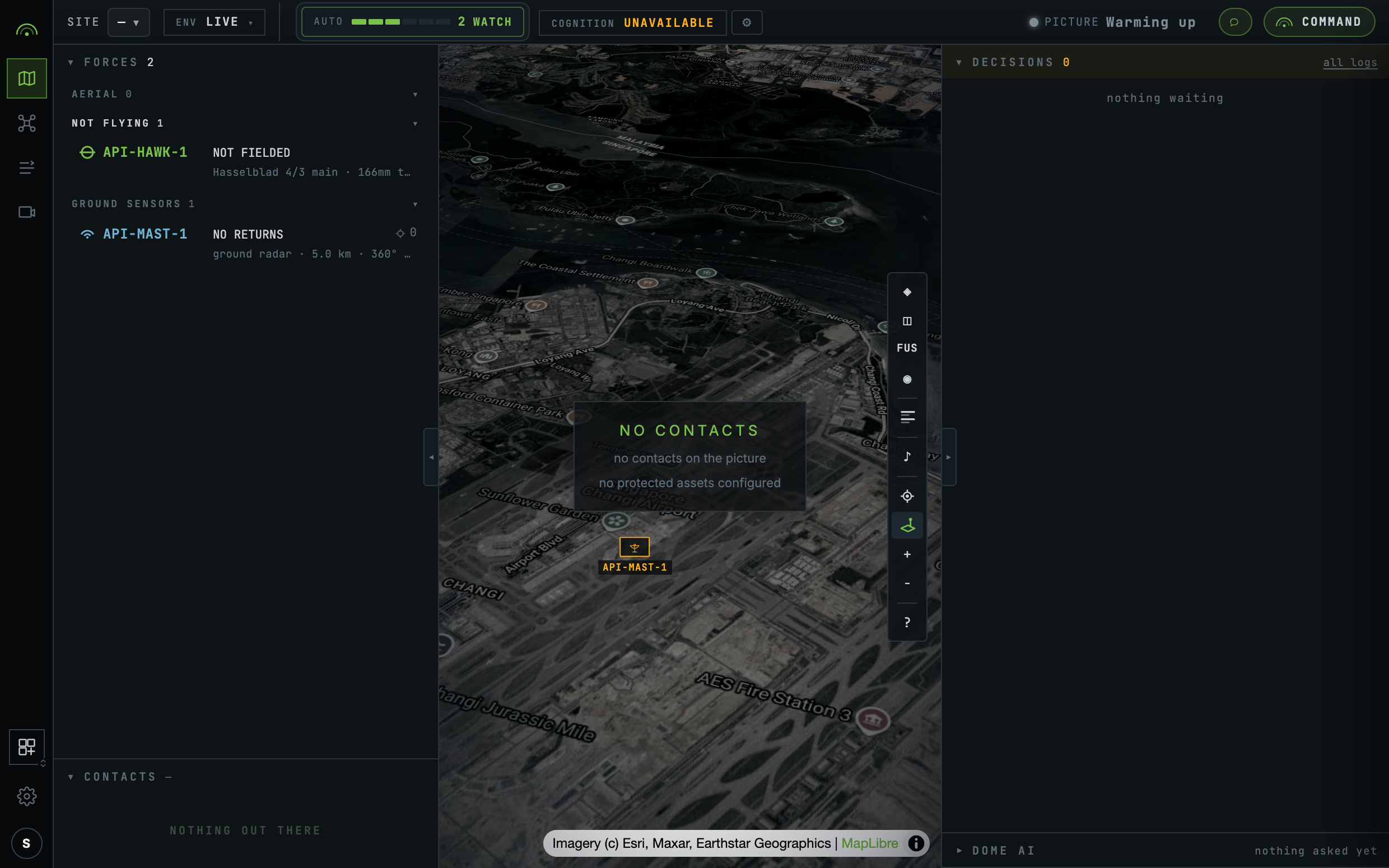
The console open on the same workspace shows the asset within seconds, without a reload:
Place a sensor
A fixed sensor is registered with kind: "sensor", a profile, and a placement:
curl -X POST https://<your-backend-host>/api/assets \
  -H "Content-Type: application/json" \
  -H "Authorization: Bearer $TOKEN" -H "X-Workspace-Id: $WORKSPACE" \
  -d '{
    "name": "MAST-1",
    "kind": "sensor",
    "catalog": "ground-radar-360",
    "placement": { "lat": 1.352, "lon": 103.992, "height_m": 12, "boresight_deg": 90 }
  }'
{ "ok": true, "data": {
  "id": "ast_f851466a16d14fe6b197c6ba09e47b8f",
  "name": "MAST-1",
  "domain": "ground",
  "kind": "sensor",
  "capabilities": [
    { "verb": "cue_sensor", "params": "target", "class": "effect", "available": true },
    { "verb": "cue_release", "params": "none", "class": "effect", "available": true }
  ],
  "placement": { "lat": 1.352, "lon": 103.992, "height_m": 12.0, "boresight_deg": 90.0 },
  "profile": "ground-radar-360",
  "sensor_id": "MAST-1",
  "…": "…" } }
Latitude comes first. Detection range, field of view and measurement accuracy come from
the profile, because they are facts about the sensor model rather than numbers to type
in. A placed sensor advertises cue_sensor and cue_release, and nothing else.
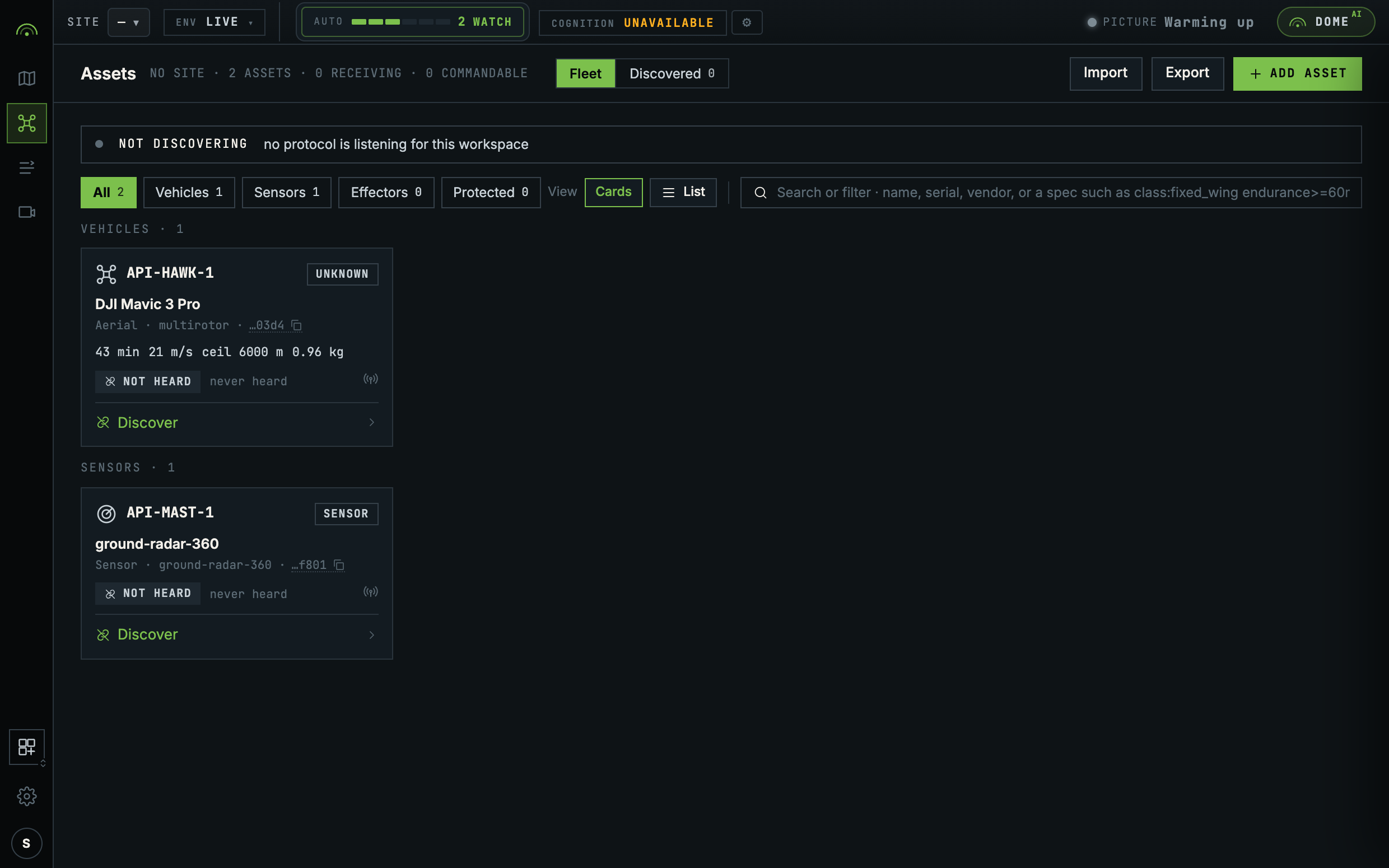
Settings, Assets lists what the API registered, in the same registry an operator adds to by hand:
When registration is refused
A refusal writes nothing. Correct the body and send it again.
| Sent | Status | code | error |
|---|---|---|---|
| A name already used in the workspace | 409 | conflict | something with that name already exists in this workspace |
A blank name | 400 | invalid_input | an asset needs a name, so an operator can call it something |
A catalog the catalogue does not hold | 404 | unknown_resource | no catalogue platform named dji-mavic-3 |
A sensor with no catalog | 400 | invalid_input | names the profiles to choose from |
| A sensor profile that does not exist | 404 | unknown_resource | no sensor profile named laser-eye |
A sensor with no placement | 400 | invalid_input | says a fixed sensor needs a placement |
lat and lon swapped | 400 | invalid_input | that placement is not a point on the earth. Check the order of the pair |
A connection.address nobody has heard | 404 | unknown_resource | nothing discovered with key mav-udp-14550-42 |
| No credential | 401 | unauthenticated | names the two headers that authenticate |
No X-Workspace-Id | 400 | invalid_input | name a workspace with the X-Workspace-Id header |
| A workspace you are not a member of | 403 | not_a_member | you are not a member of that workspace |
A body that is not valid JSON is refused with 400 and a plain-text sentence from the
JSON parser, without the envelope. Check the status before reading code.
Edit and remove
POST /api/assets/{id} changes an asset. Send only the fields that change: name,
model, performance, placement or switches. Sending the whole spec back from a
form replaces every key in it, serial included.
curl -X POST https://<your-backend-host>/api/assets/$ID \
  -H "Content-Type: application/json" \
  -H "Authorization: Bearer $TOKEN" -H "X-Workspace-Id: $WORKSPACE" \
  -d '{ "placement": { "lat": 1.352, "lon": 103.992, "boresight_deg": 200 } }'
The answer is the stored record rather than the asset view. Its id is the UUID
form, f851466a-16d1-4fe6-b197-c6ba09e47b8f for ast_f851466a16d14fe6b197c6ba09e47b8f,
and every route accepts either form. The change is in spec:
{ "ok": true, "data": {
  "id": "f851466a-16d1-4fe6-b197-c6ba09e47b8f",
  "kind": "sensor",
  "name": "MAST-1",
  "spec": {
    "model": "ground-radar-360",
    "sensors": [ { "id": "MAST-1", "profile": "ground-radar-360",
                   "boresight_deg": 200.0, "…": "…" } ],
    "…": "…" },
  "updated_at": "2026-09-17T05:45:18.347849+00:00",
  "…": "…" } }
POST /api/assets/{id}/payloads replaces what a vehicle carries, for that airframe
only.
DELETE /api/assets/{id} answers 204, and 404 if the asset is already gone.
Removing a vehicle takes it off the friendly list, so if it is still in the air its
track is scored as an unknown contact from the next cycle. Land it first.
Adopt what a link hears
A vehicle announcing itself on a link this workspace is attached to appears under
GET /api/discoveries, each with the address it was heard on. Adopting one is the
same registration call, naming the integration and that address:
curl https://<your-backend-host>/api/discoveries \
  -H "Authorization: Bearer $TOKEN" -H "X-Workspace-Id: $WORKSPACE"

curl -X POST https://<your-backend-host>/api/assets \
  -H "Content-Type: application/json" \
  -H "Authorization: Bearer $TOKEN" -H "X-Workspace-Id: $WORKSPACE" \
  -d '{ "name": "BLUE-05",
        "connection": { "integration": "mavlink", "address": "mav-udp-14550-42" } }'
The address is built from the link and the vehicle's own system id, so the same aircraft
is heard under the same address after a restart. An address nobody has heard is refused
with 404. An address this workspace already holds is refused with 409, and the error
names the asset that holds it.
Which ports and links are open is the deployment's dome.yaml, not an API call.
GET /api/links reads them.
Command an asset
Every command is the same call, a verb and its parameters, and it answers with the task it wrote.
curl -X POST https://<your-backend-host>/api/assets/$ID/command \
  -H "Content-Type: application/json" \
  -H "Authorization: Bearer $TOKEN" -H "X-Workspace-Id: $WORKSPACE" \
  -d '{
    "verb": "move_to",
    "params": { "kind": "point", "lat": 1.3521, "lon": 103.8198, "alt_m": 60 }
  }'
An accepted command answers 201, with Location: /api/tasks/tsk_…. The move_to
above needs a vehicle whose link advertises it. This answer is from cue_release on
the sensor placed earlier:
{ "ok": true, "data": {
  "id": "tsk_9358bfc5cd2d403693554d8a4c60fe65",
  "actor": "ast_f851466a16d14fe6b197c6ba09e47b8f",
  "verb": "cue_release",
  "params": { "kind": "none" },
  "origin": { "source": "operator" },
  "level": "observe",
  "gate": { "gate": "runs", "stop_within": 0 },
  "status": "issued",
  "issued_at": "2026-09-17T05:45:18.370967Z",
  "…": "…" } }
level is the rung the verb sits on (observe, manoeuvre, watch, shadow,
deny, destroy). gate is what the autonomy line answered: runs (with
stop_within, the seconds left to stop it), asks (it waits for an operator), or
not_permitted.
await fetch(`https://<your-backend-host>/api/assets/${assetId}/command`, {
  method: "POST",
  headers: {
    "Content-Type": "application/json",
    Authorization: `Bearer ${token}`,
    "X-Workspace-Id": workspace,
  },
  body: JSON.stringify({
    verb: "follow_route",
    params: {
      kind: "route",
      points: [
        { lat: 1.3521, lon: 103.8198, alt_m: 60 },
        { lat: 1.3540, lon: 103.8210, alt_m: 60, hold_s: 30 },
      ],
      on_complete: "hold",
    },
  }),
});
Flying a named route, pointing a mast and sending the nearest free drone to a map click
are all this call with a different verb. Read the record back at
GET /api/tasks.
The verbs
Lifecycle and navigation act on the asset itself. An effect acts on a track or a
place, and also passes rules-of-engagement gating. Every verb, its class and its params
kind, route points included: Command model.
The capability contract
An asset's capabilities list names each verb it accepts, its parameter kind, its
class, whether it is available right now, and a reason when it is not. A client
renders and sends only what is advertised. A verb outside the list, or advertised but
unavailable right now, is refused with 409 and an error naming the asset and the verb:
{ "ok": false, "error": "BLUE-04 cannot be commanded to Move to", "code": "conflict" }
A refusal is written down too. GET /api/tasks carries it with status: "refused" and
the refusing rule's own sentence on reason, so it can still be read a minute later:
{ "id": "tsk_9eb4c6aff1f148c0a962bbdb23d90e52",
  "actor": "ast_339a78dc2b9146aa8736bf2c05a4ccbb",
  "verb": "move_to",
  "params": { "kind": "point", "lat": 1.3521, "lon": 103.8198, "alt_m": 60.0 },
  "object": { "kind": "place", "lat": 1.3521, "lon": 103.8198 },
  "level": "manoeuvre",
  "status": "refused",
  "reason": "BLUE-04 cannot be commanded to Move to",
  "…": "…" }
An asset with no capabilities is monitor-only. That is a state, not an error.
Addressing is always by asset id, the ast_… the registry returned. No protocol
identifier appears in any path; which adapter carries the command is the server's
business.